Video Trim
How to remove the sound from a video on iPhone
Strip the music or the background noise and keep only the picture. Video Trim saves a silent copy of your video, and you can cut it to length at the same time.
Updated November 6, 2026 · Free on the App Store · iPhone & iPad, iOS 17+
Why take the sound out of a video
You may want to post a clip without the music that was playing, share a screen recording without your voice, or hand over footage for editing with no audio track. Video Trim saves the silent video as a new one, and leaves the original as it was.
Remove the sound, step by step
- Open OptiPixel and open Video Trim, then tap Get Started.
- Choose one video from your library.
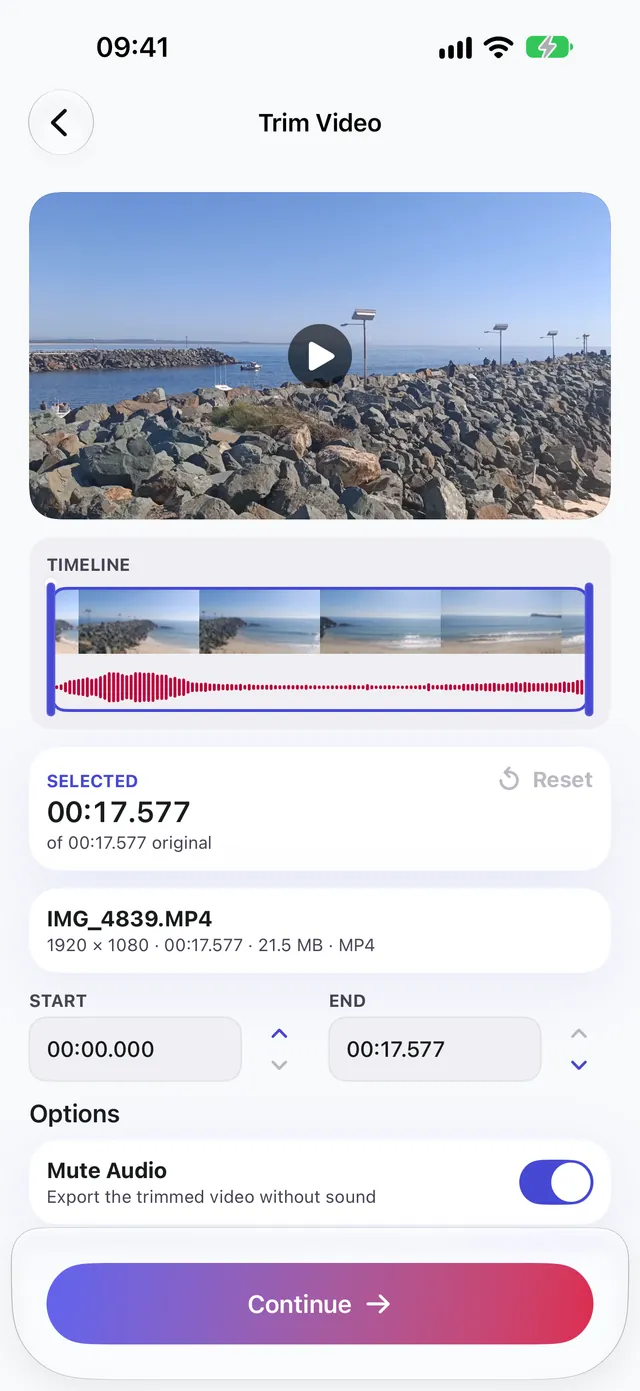
- In the editor, leave the start and end handles at the ends to keep the whole video, or drag them to keep only a section.
- Under Options, switch on Mute Audio. The preview is muted, and the app describes it as: "Export the trimmed video without sound"
- Continue to Review and tap Add to Queue. The Queue shows the task, and its row says the audio was removed.
- The new video is saved as a copy by default. It has no audio track at all, rather than a silent one.
If the video has no sound to begin with, the switch is unavailable and reads "This video has no audio"
Tips
- Trimming without the sound removed does not re-encode the picture, so it stays as sharp as the original. See the Video Trim start screen: "Trims without re-encoding".
- Want the sound without the picture instead? Use Extract audio from a video.
- To make the silent video smaller, use Compress.

OptiPixel — Reduce Photo & Video File Size
Free · No account · Runs on your iPhone
Frequently asked questions
Does Mute Audio delete the sound from my original video?
No. It saves a new video without audio. The original stays in your library unless you choose Edit Original or Replace Original in Settings.
Can I remove the sound and trim in one step?
Yes. Set the start and end, and switch on Mute Audio. The result is the chosen section without sound.
Can I mute only part of a video?
No. Mute Audio removes the audio from the whole saved video. The app does not fade or replace sound.
Can I remove the sound from several videos at once?
Not in one task. Video Trim takes one video at a time.
Is it free, and does it upload my video?
It is free, and nothing is uploaded: the video is processed on your iPhone.