Video Convert
How to convert a video to MP4, MKV, AVI or WMV on iPhone
A video that will not play on a TV, a PC or an old phone usually needs a different container or codec. Convert it on your iPhone, with nothing uploaded.
Updated November 6, 2026 · Free on the App Store · iPhone & iPad, iOS 17+
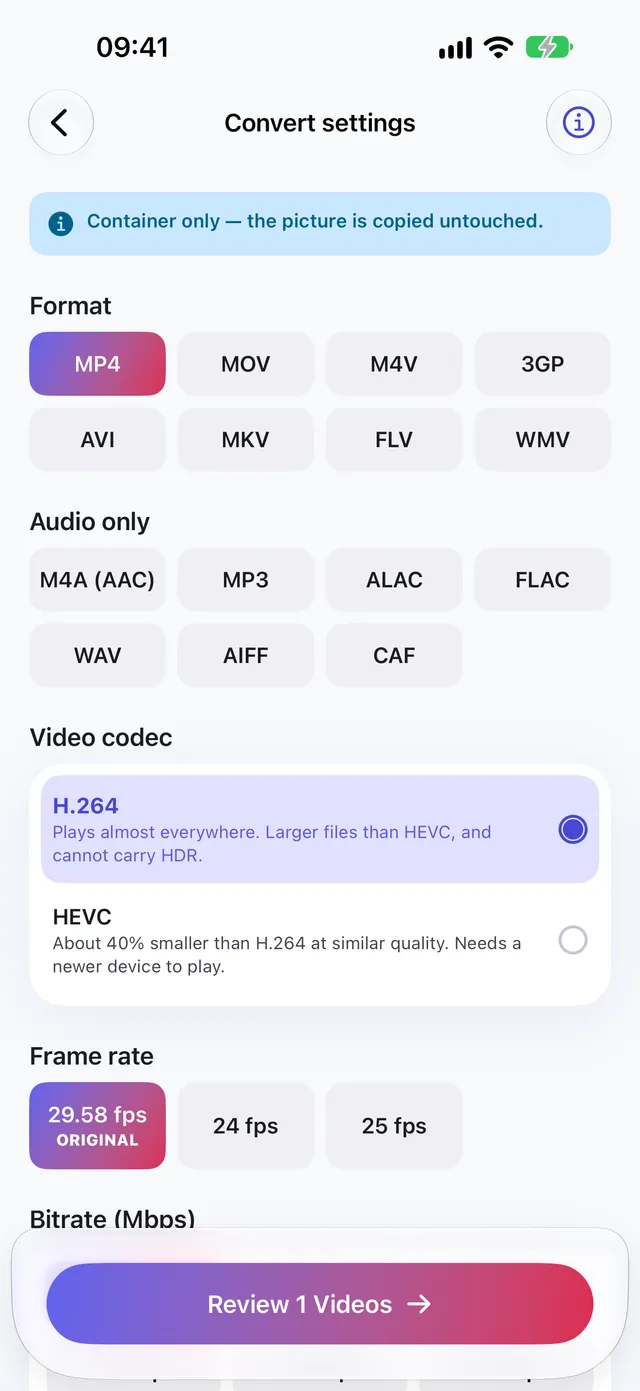
Why a video will not play, and what Video Convert changes
A video file is a container (MP4, MKV, AVI and so on) holding a picture stream in a codec (H.264, HEVC) and a sound stream. Players differ in what they accept: an older TV may refuse HEVC, a Windows machine may want AVI or WMV, and some editors only take MP4 or MOV.
Video Convert changes the container, the codec, the frame rate and the bitrate, and always writes a new file. When only the container changes and the codec, frame rate and bitrate stay as they are, the app says "Container only — the picture is copied untouched.", which is fast and does not touch the quality. Anything else says "The video will be re-encoded.".
Formats you can convert to
| Format | Video codec | Sound |
|---|---|---|
| MP4, MOV, M4V | H.264 or HEVC | Kept when the format takes it, otherwise AAC |
| MKV | H.264 or HEVC | Kept when the format takes it, otherwise AAC |
| FLV | H.264 or HEVC | AAC or MP3 kept, otherwise AAC |
| 3GP | H.264 | AAC |
| AVI | H.264 | MP3 |
| WMV | WMV 8 | WMA |
A choice a format cannot hold is not offered: HEVC is shown greyed out for 3GP and AVI, and WMV takes only WMV 8. The app describes the codecs this way: H.264: Plays almost everywhere. Larger files than HEVC, and cannot carry HDR. HEVC: About 40% smaller than H.264 at similar quality. Needs a newer device to play.
ProRes is not offered. Videos in these formats, such as an MKV or an AVI, can be picked from the Files app as well as from Photos.
Convert a video on iPhone, step by step
- Open OptiPixel and open Video Convert, then tap Get Started.
- Choose your videos from Photos or Files.
- Under Format, tap the format you want.
- Under Video codec, choose H.264 for the widest playback or HEVC for smaller files.
- Optional: under Frame rate, keep the source or pick a lower rate. The choices are rates below the video's own, such as 24 or 25 fps from a 30 fps video. A rate is never raised above the original.
- Optional: under Bitrate (Mbps), keep the source or pick 4, 8, 12, 16, 24 or 32 Mbps, or choose Custom and type your own. The screen shows the range allowed for that video, and a value outside it is refused. Only the presets that fit that range are shown.
- If your video is HDR, a Keep HDR switch appears. HDR stays HDR only for HEVC in MP4, MOV, M4V and MKV. Every other format converts it to SDR, and the screen says so.
- Tap the button at the bottom (it reads Review, with the number of videos), check the summary, then tap the button that reads Convert, with the number of videos. It runs in the Queue while you do something else, and the Queue shows the frame rate and bitrate of the file that was actually written.
Where the result is saved
A converted MP4, MOV, M4V or 3GP is saved like other results, to your Photos library or to the destination chosen in Settings. Photos cannot hold FLV, MKV, AVI or WMV, so for those formats the result is saved in the OptiPixel folder instead, whatever the Settings destination says, and Review tells you so. You can open it from the Storage tab under App Storage.
Tips
- To make a video smaller rather than a different format, use Compress.
- Video on your computer or in a Drive link? See Send files over Wi-Fi or Add a file from a link.
- For the sound alone, choose Audio only in the same screen. See Extract audio from a video.
- For a video without any sound at all, see Remove the sound from a video.
- Changing only the container is quick. A new codec or frame rate re-encodes the picture, which takes longer and uses more battery.

OptiPixel — Reduce Photo & Video File Size
Free · No account · Runs on your iPhone
Frequently asked questions
Can OptiPixel convert a video to MKV, AVI or WMV?
Yes. MKV works with H.264 or HEVC, AVI with H.264 and MP3 sound, and WMV is written as WMV 8 with WMA sound. Photos cannot store these, so the result goes to the OptiPixel folder.
Which formats can I not convert to?
ProRes is not offered, and 3GP and AVI do not take HEVC. WebM and other formats that are not in the table above are not available.
Does converting reduce quality?
Changing only the container does not. Re-encoding does cost some quality, because the picture is compressed again. Choosing HEVC makes files smaller than H.264 at similar quality, but needs a newer device to play.
Can I raise the frame rate or bitrate?
You cannot raise the frame rate above the video's own, since that would invent frames. A custom bitrate is limited to a range shown for that video, and a higher number there only makes the file larger.
Is Video Convert free?
The formats and settings are free. A free task takes 1 video. One short video unlocks 2 or 3 videos in one task, and OptiPixel Premium has no limit; more than 3 videos in one task need Premium.
Does it upload my video?
No. The conversion runs on your iPhone.